

Key Takeaways
What's Actually Happening Inside the Battery
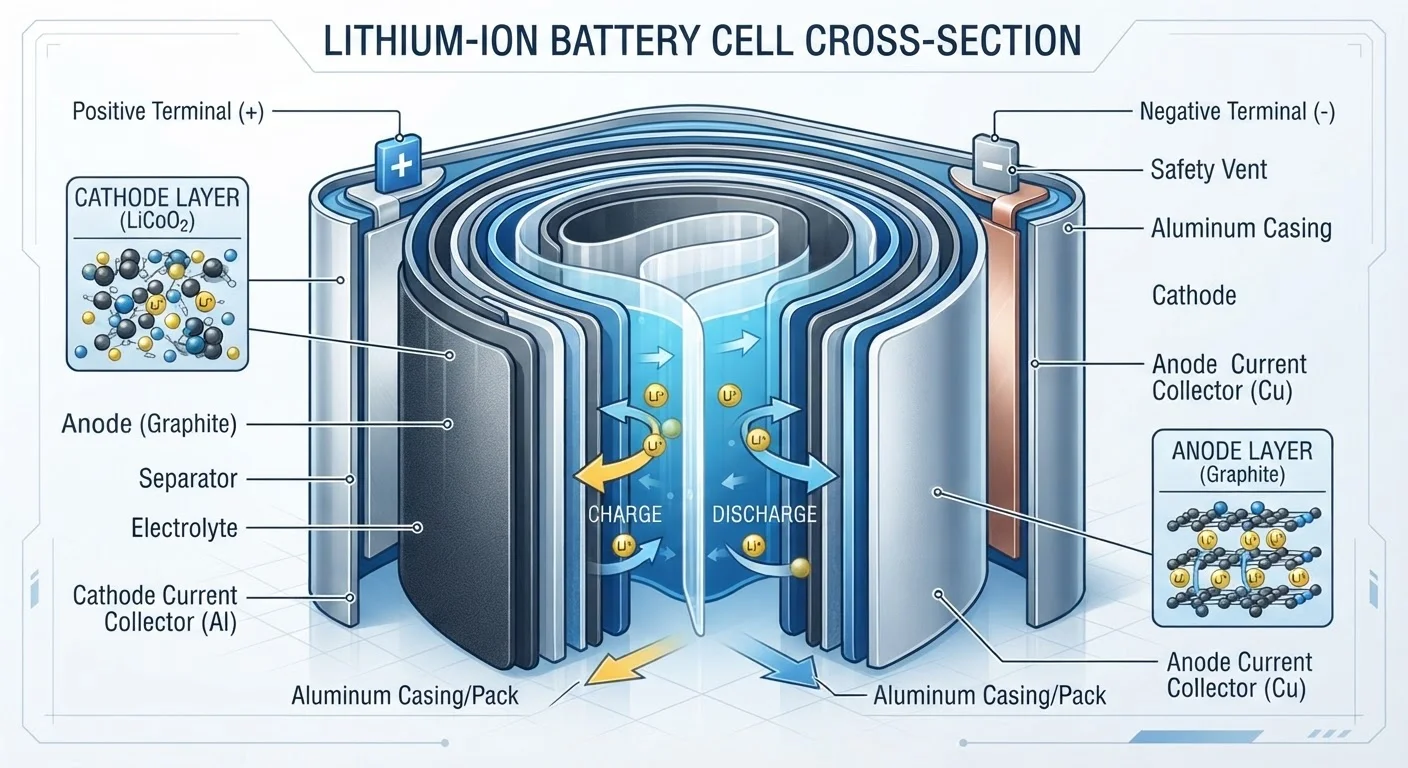
A lithium-ion battery works by moving lithium ions back and forth between two electrodes - a graphite anode (negative side) and a metal-oxide cathode (positive side) - through a liquid called an electrolyte. When you charge the battery, ions travel to the anode and park there. When you use the device, they flow back to the cathode, releasing energy in the process.
The problem is that this shuttle system is imperfect. With each cycle, a small amount of lithium gets permanently trapped in chemical byproducts on the anode surface, forming a layer called the solid electrolyte interphase (SEI). Over time, this layer thickens, blocking ions from reaching electrode material that's still structurally intact. The result: your battery holds less charge than it used to, even though much of it still physically exists.
The cathode also degrades. Repeated expansion and contraction of electrode material causes microscopic cracking, and the metal oxides can gradually lose their crystalline structure. Both processes reduce how many ions the electrode can accept - shrinking overall capacity. This is why battery degradation isn't a sudden failure but a slow, continuous decline.
If you've noticed your phone feeling sluggish as it ages, the battery is often a contributing factor. See what's actually causing your device to slow down for a fuller picture of how battery health ties into overall performance.
The Conditions That Speed Up Degradation
Not all usage patterns wear batteries equally. Several conditions accelerate the chemical processes described above:
~20%
Typical capacity lost after 500 full charge cycles
Battery manufacturers commonly rate lithium-ion cells to retain roughly 80% of original capacity after 300-500 full charge cycles under standard conditions.
2×
Faster degradation rate at elevated temperatures
Research in electrochemistry literature consistently shows that operating or storing lithium-ion batteries at high temperatures can roughly double the rate of capacity fade compared to room-temperature conditions.
Heat is by far the most damaging environmental factor. Elevated temperatures speed up the chemical reactions that form and thicken the SEI layer, cause electrolyte decomposition, and accelerate cathode breakdown. A battery stored or charged at high temperatures ages dramatically faster than one kept cool.
High state of charge is also stressful. Keeping a battery at or near 100% for extended periods holds the cathode in a high-energy, structurally strained state. The ions sitting in the anode create mechanical pressure on the SEI layer. Manufacturers sometimes ship devices with a charge limit set below 100% to manage this stress during storage.
Deep discharges - letting the battery drop to near 0% regularly - place similar strain on the anode and can permanently reduce the number of lithium ions available for cycling.
Fast charging pushes current through the battery quickly, which generates more heat and can cause lithium to deposit unevenly on the anode (a phenomenon called lithium plating), accelerating SEI growth. It's a convenience worth understanding: fast charging isn't inherently dangerous, but it does carry a long-term cost. For a closer look at common misunderstandings here, separating charging myths from battery science is worth reading alongside this article.
Practices That Genuinely Preserve Battery Life
The good news is that several evidence-backed habits can meaningfully slow the rate of degradation. These aren't folk wisdom - they reflect the actual chemistry described above.
Keep your charge level between 20% and 80% whenever practical.
This "middle zone" reduces the mechanical and chemical stress placed on both electrodes. Spending less time at the extremes slows SEI growth and reduces cathode strain, preserving more capacity over hundreds of cycles.
Avoid exposing your device to high ambient temperatures.
Heat is the primary driver of accelerated chemical degradation in lithium-ion cells. Even passive heat - such as leaving a phone on a sun-warmed car dashboard - adds cumulative wear that charge habits alone can't undo.
Use standard charging speeds for everyday top-ups; reserve fast charging for when you need it.
Fast charging generates more internal heat and can cause uneven lithium deposition on the anode. Using a standard charger overnight - or whenever time isn't a constraint - reduces this incremental wear without meaningfully changing your routine.
Enable your device's built-in battery optimization or charge limit settings.
These software features are designed by engineers who understand the chemistry. They automate many of the practices above - particularly reducing time spent at full charge - without requiring manual effort from the user.
If storing a device long-term, keep the battery around 50% charge in a cool location.
A battery stored fully charged or fully depleted degrades faster than one kept at a mid-level state of charge. Low temperatures also slow the chemical reactions responsible for capacity loss during idle storage.
What Modern Devices Do Automatically
Device manufacturers have incorporated battery management features that do some of this work for you. Many smartphones and laptops now include optimized charging modes that learn your habits and pause charging at 80% overnight, only topping up to 100% shortly before you typically unplug. This reduces the time spent at high charge states without requiring you to manually intervene.
Check Your Battery Health Periodically
Most modern smartphones and laptops display a battery health percentage in their settings. Checking this every few months gives you a concrete sense of how your usage habits are affecting capacity over time. If health drops below 80%, many device manufacturers consider a battery replacement worth evaluating.
Some devices also throttle performance slightly when battery health drops below certain thresholds - a well-documented behavior that prioritizes stable operation over peak speed. If you've noticed performance changes and want to understand the broader picture, why apps feel slower over time explains what's happening on the software side as well.
Battery health percentages displayed in device settings are estimates based on measured capacity versus the factory specification. A reading of 80% health generally means the battery can hold 80% of its original charge - useful context when evaluating whether a replacement makes sense.